
How to Install IPTV Smarters Pro on TV
📺 What Is IPTV Smarters Pro?
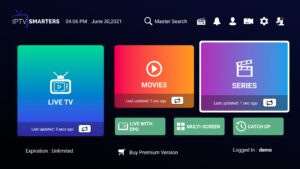
IPTV Smarters Pro is one of the most popular apps for streaming IPTV channels, movies, and series on Smart TVs. It’s easy to install, user-friendly, and compatible with most devices including Samsung, LG, Android TV, Firestick, and more.
Below is a simple step-by-step guide to help you install and activate IPTV Smarters Pro on TV.
🧭 Step-by-Step Installation Guide
🔹 Step 1: Download the App
Go to your TV’s official app store:
-
Samsung Smart TV: Open Smart Hub → Search “IPTV Smarters Pro.”
-
LG Smart TV: Go to LG Content Store → Search “IPTV Smarters Pro.”
-
Android TV or Firestick: Open Google Play Store or Amazon Appstore → Search “IPTV Smarters Pro.”
Click Install and wait for the download to complete.
🔹 Step 2: Launch the App
Open the app from your TV’s main menu.
On the welcome screen, select “Login with Xtream Codes API.”
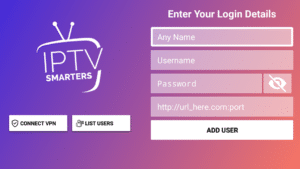
🔹 Step 3: Enter Your Subscription Details
Use the credentials sent to you after purchase:
-
Username
-
Password
-
Portal URL
Enter these details carefully, then click Add User / Login.
🔹 Step 4: Enjoy Streaming
Once logged in, IPTV Smarters Pro will load your channel list, movies, and series.
You can now explore Live TV, VOD, and Series — all in HD and 4K quality (depending on your plan).
⚙️ Tips for Smooth Setup
-
Ensure your internet connection is stable (minimum 20 Mbps for HD).
-
Always use the official version of IPTV Smarters Pro from your TV’s app store.
-
For any setup help, contact our 24/7 support team via email or WhatsApp.
🧠 Final Thoughts
Installing IPTV Smarters Pro on your Smart TV is quick and simple — no technical experience required.
Within minutes, you’ll have access to thousands of live channels, movies, and series with your IPTV Smarters Pro Subscription.