
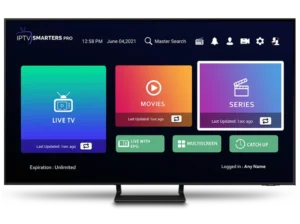
Installation guide :
Press the Smart Hub button on your Samsung TV remote.
Search for “IPTV Smarters Pro” in the App Store and install it.
Open the app and choose “Log in with Xtream Codes API.”
Enter the username, password, and portal URL you received after activating your IPTV Smarters Pro Subscription.
Turn on your LG Smart TV and press the Home button on the remote.
Go to the LG Content Store and search for “IPTV Smarters Pro.”
Install the app and open it once the download is complete.
Select “Login with Xtream Codes” as your login method.
Enter your subscription details — username, password, and portal URL — to activate your account.
Installation guide :
From your TV’s app store (Samsung, LG, or other compatible devices), download one of the supported IPTV applications:
SetIPTV, NetIPTV, Smart IPTV, IBO Player, Flix IPTV, SmartOne, SS IPTV, OTT Player, or IPTV Extreme.
After installation, open the app. You’ll see your device’s MAC address displayed on the screen — please note it down.
Send your MAC address to us via WhatsApp or email, so we can link your device to our IPTV server.
Once your device is activated, we’ll notify you. Simply restart or reboot your TV, then open the app — your IPTV Smarters Pro Subscription will now be ready to use.
💡 Note: These apps are third-party and not owned by us. They are paid applications, but as a bonus, we cover the activation fees for our subscribers.
You only need to send us your app’s MAC address via email or WhatsApp, and we’ll handle the rest.
Installation guide :
Download the IPTV Smarters Pro app directly from the official link below:
🔗 https://www.iptvsmarters.com/download?download=windows
After downloading and installing the app, open it and choose “Login with Xtream Codes API” from the menu.
Enter the subscription details you received after purchase — your username, password, and portal URL — to log in and start streaming instantly with your IPTV Smarters Pro Subscription.
Installation guide :
Download the IPTV Smarters Pro app for Mac from the official link below:
🔗 https://www.iptvsmarters.com/download?download=mac
After downloading and installing the app, open it and select “Login with Xtream Codes API” from the main menu.
Enter your subscription details — including username, password, and portal URL — provided after your purchase, to start streaming with your IPTV Smarters Pro Subscription instantly.
Installation guide :
Search “IBO PLAYER PRO” on Google Play or use this link: https://play.google.com/store/search?q=ibo%20pro&c=apps
Install, then open the app.
Tap Continue → Add playlist
Choose XTREAM-CODES-API
Enter the Portal URL, Username, and Password we sent by email/WhatsApp
Tap Save, select your new playlist, then Connect
If the playlist doesn’t load, close/reopen the app and Reload playlist
On first launch, note your MAC Address and Device Key (shown on screen)
Send both via WhatsApp or Email
We’ll add your server remotely; just restart the TV/app and start watching
IBO Player Pro is a third-party player (not owned by us) and is a paid app.
As a bonus for subscribers, we cover the app activation fee—just send us your MAC Address (and Device Key) via email or WhatsApp, and we’ll handle activation.
Installation guide :
Step 1 — Install
Search “IBO Pro Player” in the App Store or use: https://apps.apple.com/nl/app/ibo-pro-player/id6449647925
Install the app and open it.
Step 2 — Get Your IDs
On first launch you’ll see a screen showing your MAC Address and Device Key. Keep this screen visible or take a screenshot.
Step 3 — Fast Activation (Recommended)
Send your MAC Address and Device Key to us via WhatsApp or Email.
We’ll link your device to our server. After we confirm, restart the app and start watching.
Self-Setup (Optional)
If the app offers playlist/API login: choose Xtream Codes / API, then enter the Portal URL, Username, and Password we sent by email/WhatsApp → Save → select playlist → Connect.
If the playlist doesn’t load, close/reopen the app and Reload.
Note: IBO Pro Player is a third-party player (not owned by us) and is a paid app. As a bonus for subscribers, we cover the app activation fee—just send your MAC Address (and Device Key) via WhatsApp or Email and we’ll handle the activation for you.
Installation guide :
Once your MAG Box has finished booting, the main portal screen will appear. Using your remote, click on “Settings” and press the “SET” button.
Select “System Configuration” from the menu.
Inside System Settings, choose “Servers.”
From the Servers menu, click on “Portals.”
In the Portal 1 Name field, enter a name of your choice (e.g., IPTV Smarters Pro).
In the Portal 1 URL field, enter the server URL provided after your subscription activation.
💡 To activate your IPTV Smarters Pro Subscription, please send us your MAG Box MAC address (found on the label at the back of your device) via email or WhatsApp.
We’ll activate your service remotely and provide your portal URL for setup.
Click “OK” to save your settings.
Press “EXIT” on your remote to go back.
Finally, reboot your MAG Box and select “OK” to apply the new settings.
Your IPTV Smarters Pro Subscription is now ready to stream live TV, movies, and series.
We’re passionate about delivering the best global TV content directly to your screen — connecting viewers worldwide through the power of streaming.
Discover the ultimate IPTV entertainment experience with Our services today!
Email: contact@iptvsmarters-pro.us
2011-2025 © All rights reserved by iptvsmarters-pro.us – The best IPTV Subscription provider.